
DJOBOXDJOBOXGame Hosting & Apps
DJOBOX CONTROL

All your servers.
One interface.

DJOBOX Control brings together the console, files, backups, network, players, monitoring and settings in one interface for all your games and applications.

Included with your DJOBOXGames and applicationsFeatures tailored to the service
SEE CONTROL IN ACTION

An interface designed to be understood.
Even when your server gets complex.

DJOBOX Control puts the essentials first while keeping advanced features accessible without turning every page into a technical control panel.

my.djobox.com
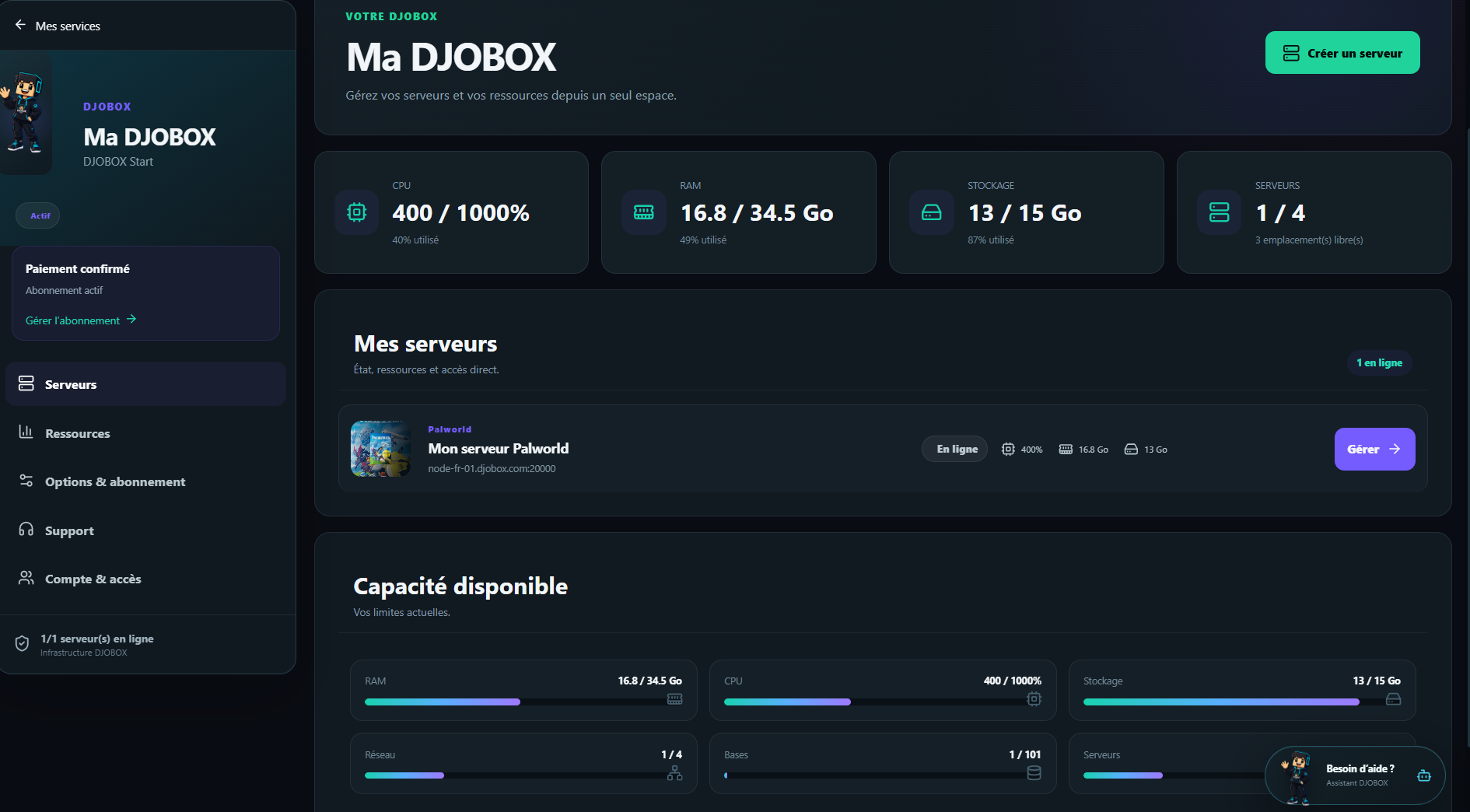
DJOBOX Control dashboard
OVERVIEW

Your resources and servers at a glance.

Available capacity, active servers, overall status and quick actions are grouped on the home screen.
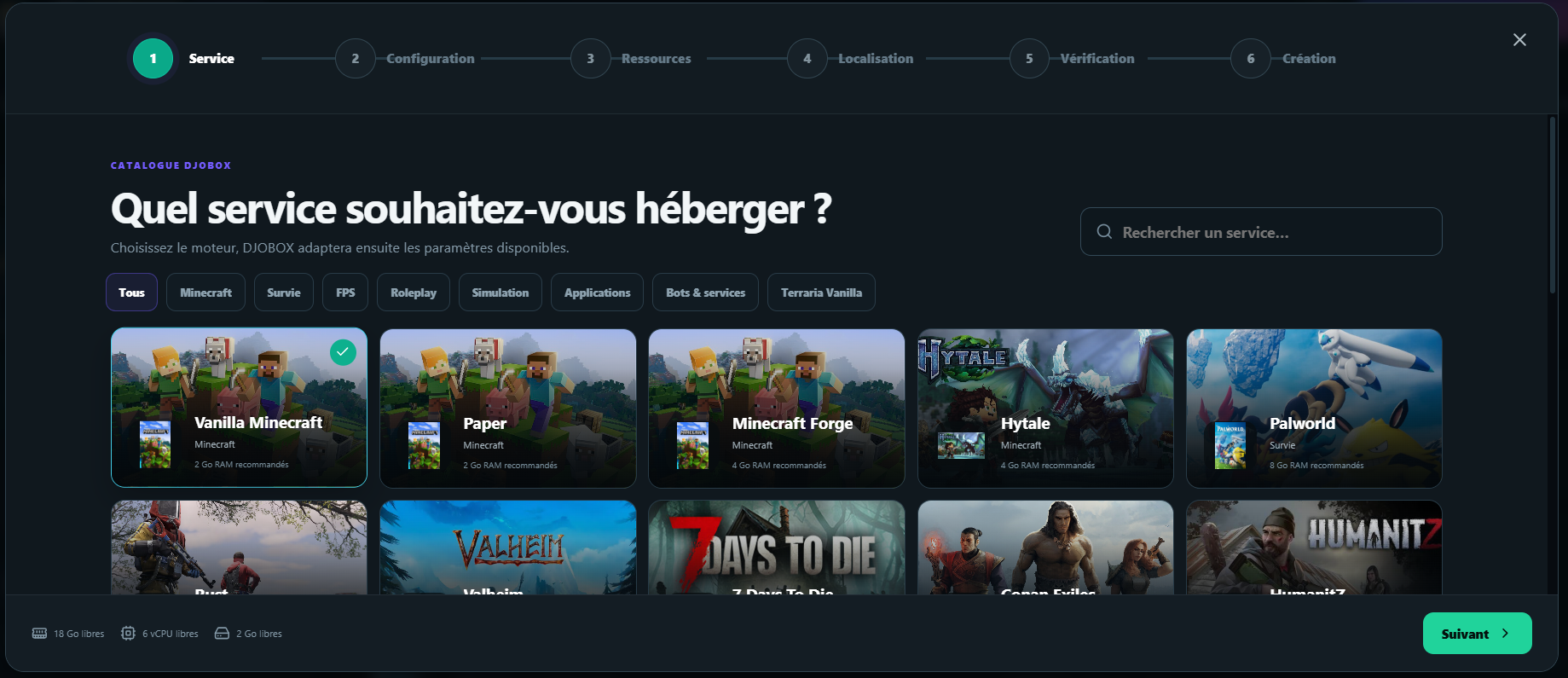
Assistant de création DJOBOX
GUIDED CREATION

From game selection to a ready server.

A clear flow guides you through creation without requiring you to know every technical detail.

A COMPLETE PLATFORM

From startup to troubleshooting.
Everything stays in one place.

Each game or application displays the tools that are genuinely useful for it. You immediately find what matters, without unnecessary menus or multiple interfaces.

Control and monitor

The useful information you need to immediately understand what your service is doing.

Dashboard & monitoringService status, CPU, memory, storage, network and real-time metrics.
Performance historyReview resource and activity trends across multiple periods.
Health ScoreA summary indicator highlights the points that deserve your attention.
Live consoleFollow logs, send commands and control your service in real time.
Activity historyFind important actions, translated and timestamped.

Configure your service

Adjust your server without blindly editing files.

Guided configurationEdit available variables with clear descriptions and categories.
Expert modeAccess technical variables when you need more precise control.
Version managementChange versions with optional safety backup and automatic reinstall.
ReinstallationStart again from a clean installation directly from Control.
Power actionsStart, stop, restart and force stop from the control bar.
Per-server resourcesReallocate RAM, CPU, storage, backups, databases and ports between your servers without changing plan, within your DJOBOX limits.

Files and data

Everything related to your files, backups and persistent data.

File StudioBrowse, upload, organize and edit files from the browser.
SFTP accessUse your usual SFTP client when you prefer a local tool.
DJOBOX VaultManual and automatic backups, configurable frequency and restore.
Backup protectionQuota tracking and safety backups before certain sensitive operations.
DatabasesCreate and manage SQL databases linked to your services from DJOBOX Control.

Games and communities

Dedicated tools appear when the game or service supports them.

Player CenterOnline players, activity, session history, ping and actions available depending on the game.
Extensions, mods & modpacksInstall and manage compatible content for many games: plugins, mods, modpacks and extensions.
Safe extension installationControl checks compatibility and can prepare a safety backup before certain installations.
Discord integrationSend important server events to a Discord channel.

Automate and organize

Save time on repetitive operations and teamwork.

AutomationsCreate routines with a target time and multiple steps.
Action sequencesChain commands, backups, starts, stops or restarts.
Team & permissionsShare service management with collaborators from your Team area.
NotificationsFind important information related to your account and services.

Network and migration

The tools needed to expose services cleanly and migrate an existing project.

Network & portsAdd, remove and organize available ports, choose the primary port, its protocol and its role.
Custom DJOBOX addressChoose an address such as your-name.djobox.com for your DJOBOX. It remains linked even when infrastructure changes.
Application configurationControl shows the listening host and primary port your applications should use.
Migration CenterImport a ZIP, TAR, TAR.GZ or TGZ archive into the selected destination folder.
Migration historyTrack import status and review recent operations.
DiagnosticsCentralize the information needed to understand a service and its resources.
DJOBOX CONTROL

A single product.
Tools tailored to the service.

The interface adapts to how you use it: player management, plugins, mods and modpacks for compatible games, as well as files, networking, monitoring and configuration for your applications. You only see what is relevant.

Real-time monitoringMarketplace compatibleDJOBOX VaultMigration CenterPlayer CenterNetwork & ports
CONTROL AT THE CENTER

Control every day.
Discord and API when you need them.

DJOBOX Control remains the main interface. DJOBOT and the API complement your workflow when you want to go further.

01 · CONTROL

The complete cockpit

Console, files, backups, networking, monitoring, team, Marketplace and settings from your browser.

Open Control
02 · DJOBOT

Your DJOBOX on Discord

Access DJOBOX commands and interactions directly in your Discord environment, without having to return to Control for every operation.

Join Discord
03 · API & AI

Make it programmable

Connect your scripts, bots, automations or AI assistants with access limited to what you allow.

Discover the API
QUESTIONS

Control in practice.

Are all features available on every service?+

No. DJOBOX Control adapts the interface to the capabilities of the game or application. Features that are not relevant to a service are not prominently displayed.

Can I manage multiple servers in the same DJOBOX?+

Yes. Each service has its own management area and uses the resources available in your DJOBOX.

Can I migrate an existing server?+

Migration Center lets you import supported archives and track the operation from Control.

Do I need to know Linux?+

Not for day-to-day operations. Settings, files, backups, databases, ports and main actions are accessible from the interface.

DJOBOX CONTROL INCLUDED

Your hosting goes beyond the server.

Configure your capacity, then manage your services from the same platform.

Configure my DJOBOX